MassMutual is a Bring Your Own Device (BYOD) organization, giving you the freedom to use any device that meets MassMutual’s hardware & software requirements.
A full list of updated requirements can be found here: MassMutual Technology Standards and Accessibility
Windows Laptops & Desktops Requirements
Operating System* | Windows 11 Professional 24H2+ | 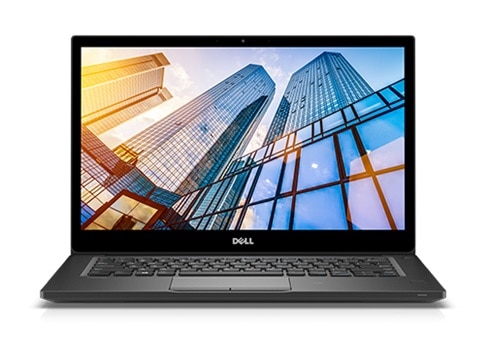 |
Processor | 12th generation and newer Intel i5/Ultra 5 or i7/Ultra 7. | |
Memory | 16GB+ RAM | |
Storage | 256GB+ Solid State Drive | |
Encryption | BitLocker | |
Software | Workspace ONE, Crowdstrike, Microsoft Office (provided by MassMutual) |
* Operating system version requirements are subject to change as newer versions are released.
** Windows 10 will no longer be supported after January 2025. Devices that cannot be upgraded to Windows 11 Pro will be blocked from software enrollment.
Is my device compatible?
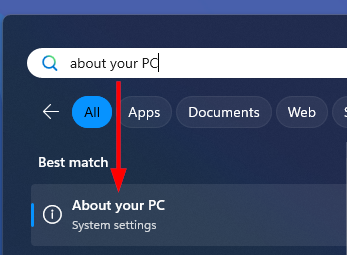
You can check your device specifications by searching for and opening About Your PC in the Windows start menu.
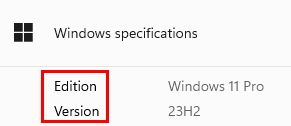
The Windows Specifications section will list the Edition and Version.
What if my device only has Windows 11 Home?
Please reach out to us to review your device. Many Windows 11 Home computers can be upgraded to Windows 11 Pro with an upgrade purchased via Amazon or through the built-in Microsoft Store (advisor’s responsibility).
Amazon purchase link (RECOMMENDED - license key can be transferred)
Microsoft Store upgrade instructions (requires Microsoft Account, upgrade is tied to one device)
How do I check my Processor and Memory (RAM)?
You can check your device specifications by searching for and opening About Your PC in the Windows start menu.
Processor and Installed RAM will be listed in the Device Specifications section: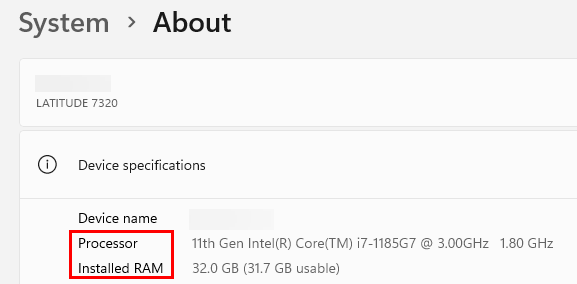
NOTE: Devices with older ARM-based processors (Microsoft Surface Pro X for example) are not supported in our environment due to software incompatibility. SnapDragon processors may be supported - please contact us so we can review specifics.
If you are unsure if your device meets these requirements, please submit a ticket and we can schedule time to review
Was this article helpful?
That’s Great!
Thank you for your feedback
Sorry! We couldn't be helpful
Thank you for your feedback
Feedback sent
We appreciate your effort and will try to fix the article