Computers left unattended in a logged-in state are vulnerable to unauthorized use and access. When away from your device for any amount of time, lock your screen to protect sensitive client and company data. Doing so will prevent unauthorized access, while keeping any work in progress open.
Please note that closing your laptop may not lock your device - this will depend on your device settings. As such, please be sure to lock your device prior to closing your laptop lid.
Windows PC
Option A: Keyboard shortcut
- On your keyboard, press the Windows key and L key simultaneously.

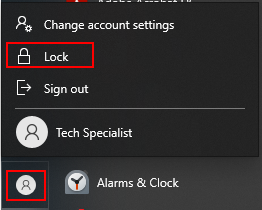
Option B: Lock from the start menu
- Click on the Windows icon in your taskbar
- Click on your user icon
- Select Lock.
Apple/Mac Computer
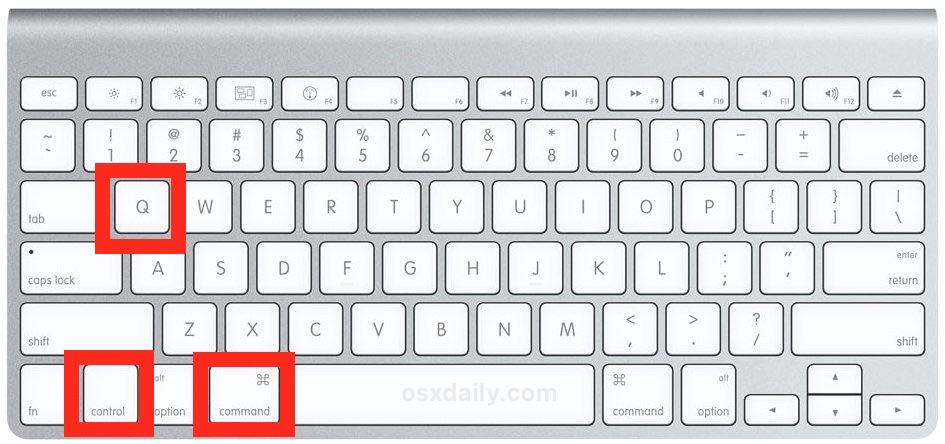
Option A: Keyboard shortcut
- On your keyboard, press Command + Control + Q together
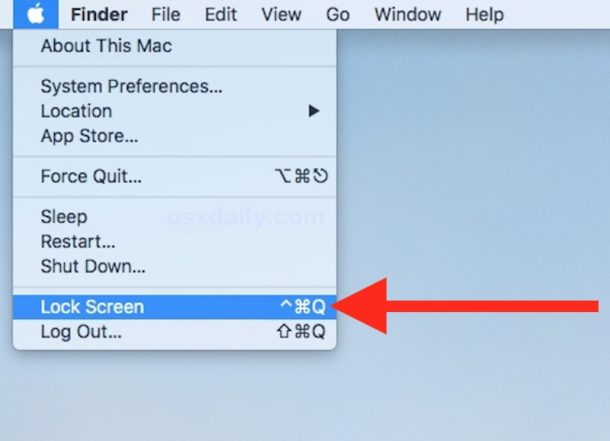
Option B: Lock from the menu bar
- Click on the Apple symbol in your menu bar
- Select Lock Screen.
Was this article helpful?
That’s Great!
Thank you for your feedback
Sorry! We couldn't be helpful
Thank you for your feedback
Feedback sent
We appreciate your effort and will try to fix the article