Every employee and contractor has a responsibility to maintain reasonable and adequate protection of company-restricted and confidential information.
If possible, leave MassMutual devices or devices containing MassMutual data at home.
However, if devices containing MassMutual data will be traveling with you, follow these guidelines:
- If you are unable to keep your device(s) with you, lock the device(s) in a secure location.
- Carry your devices; do not store them in checked luggage.
- Be mindful of people viewing your screen when working in public places.
- Learn about VPN Usage at MassMutual and how it may impact your international travel connection.
- Reset your OKTA Mandatory Password Reset when you return from your trip to ensure your information stays secure.
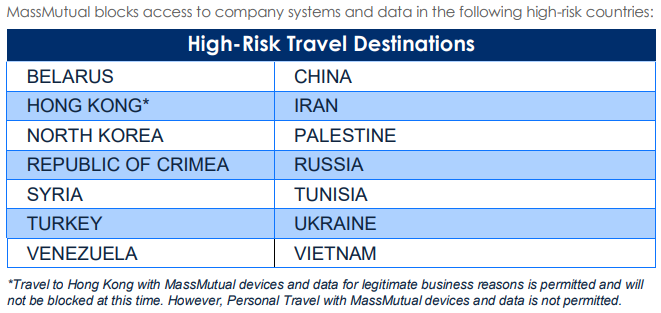
Review a list of High-Risk Travel Destinations . By default, MassMutual blocks activity in all high-risk countries from accessing Okta. This means you will not be able to use your device or access MassMutual data in any of those countries.
List of High-Risk Travel Destinations as of September 2024:
Was this article helpful?
That’s Great!
Thank you for your feedback
Sorry! We couldn't be helpful
Thank you for your feedback
Feedback sent
We appreciate your effort and will try to fix the article