We recommend sharing folders via OneDrive on the web.
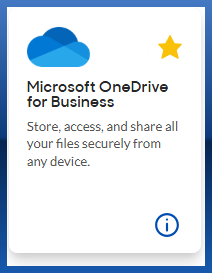
- Navigate to OneDrive on the web via the Compass Tool Selector or this link: https://massmutual-my.sharepoint.com
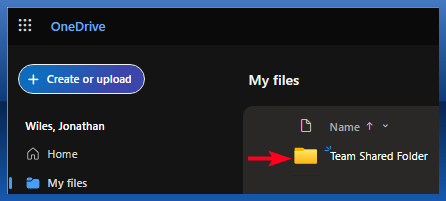
- Navigate to the folder you'd like to share, e.g. Team Shared Folder
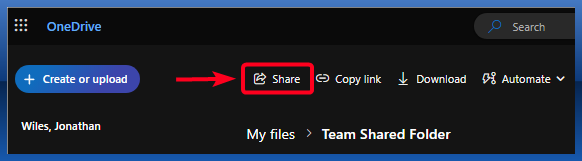
- Once inside the folder, select the Share icon
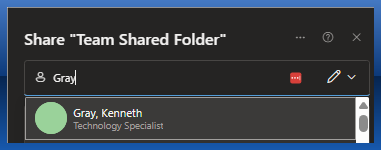
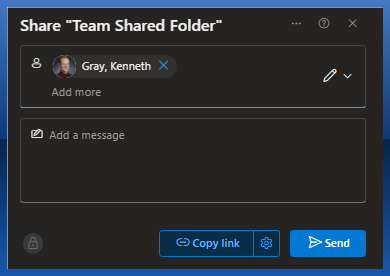
- In the box that appears, search for the individual you'd like to share with and click on the correct result
- Type a message if needed, and then click Send. This will grant access to all files and subfolders within the folder you are sharing.
The recipient will receive an email notifying them the folder has been received. For internal users, they can access the folder via OneDrive on the web > Shared section.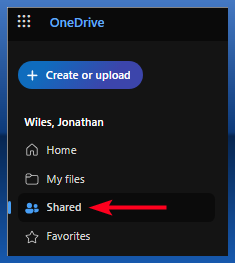
For ease of access, the recipient can then select Add shortcut to My files to add the folder to their My files section and desktop OneDrive.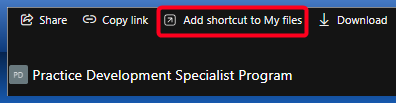
Was this article helpful?
That’s Great!
Thank you for your feedback
Sorry! We couldn't be helpful
Thank you for your feedback
Feedback sent
We appreciate your effort and will try to fix the article